How to Refresh Blog Content for Stronger SEO (Without Starting Over)
Filed Under


Have you ever wondered if it’s better to refresh and existing blog or start all over again? Or whether your blog continues to get traffic? Or maybe, why is a blog that once preformed well dropping off? Then this is for you. We are going to walk through How to refresh a blog for stronger SEO, to get traffic back onto your site with practical steps any entrepreneur can follow.
What a blog or content refresh actually means (and what it doesn’t)
First lets talk about what a blog refresh actually means. It doesn’t mean completely re-writing the blog, but it does mean making strategic (most overused word ever right?) updates so that Google and other search platforms recognize the fresh content. One of the common mistakes I see as an SEO Strategist and an easy example is let’s say your business celebrates “Postpartum Mental Health Week” every year and so you want to write a blog post about how your business helps. So, each year you post a NEW post and name it “Postpartum Mental Health Week 20XX”. This is the WRONG strategy and here’s why:
- Most likely the content isn’t unique enough that search may see it as duplicate content (spammy)
- No one is going to go back and read something that seems old, so as soon as the new year passes, that blog with the last ‘year’ on it is now null and void
What should you do? You should UPDATE said blog instead. So each year, you go into the same blog, update the year, and update it with your current recommendations. It can be a repeatable part of your blogging process. This is why you should never put the year in your URL slug.
A blog refresh is taking an existing blog, re-affirming the SEO keyword research, and adding in new, relevant content to that blog. It may also mean looking at what is ranking for that particular keyword to ensure you can stand out. This, in the end, is less work than writing completely new content, and it can give you the same bang for your buck.
Signs your blog content needs a refresh
How do you know your blog needs a refresh? First and foremost is going to be traffic indicators!
Your Blog Traffic Has Dipped
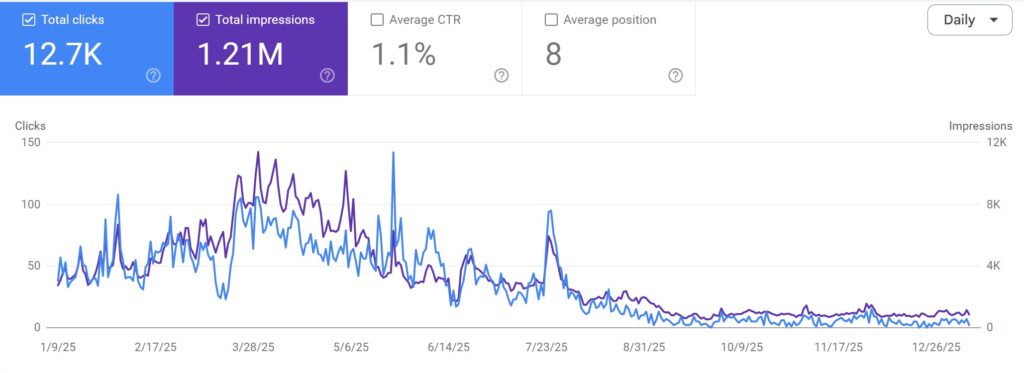
This is an example of a blog that was on the first page of Google for YEARS and then, what you can see is the traffic and clicks have dropped off. This may be way more traffic than what your site is getting, and that’s OK, but what it shows you is how after a while, there may be new, better, blogs that come out on the same topic that begin to outrank you.
So if you see this….
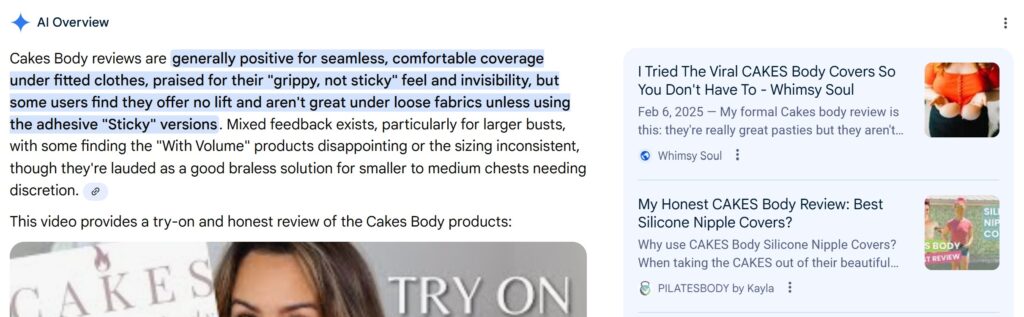
The next step is to search the main keyword for the blog and see what IS ranking on the first page. For example, in the AI overview, you can see the top post on the left is updated as of February 2025, whereas the one below it doesn’t show a recent date. Also, the content creator that is featured in the large AI overview has an original video from 2024, and an updated video from 2025.
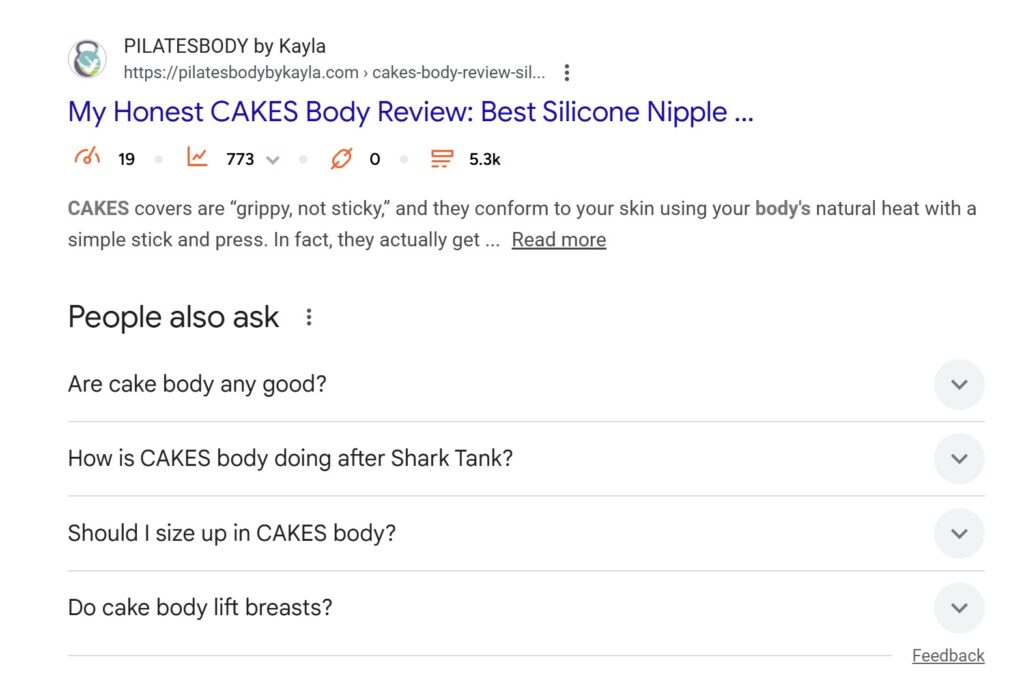
Now, another thing to look at in Google is if “People” always ask comes up. If it does, make sure you are including those questions in your updated blog:
Okay, let’s get back to other ways you might be able to tell you need to refresh your blog.
Your Blog Isn’t Getting Any Traffic
Often times I see people write blogs from the heart, with no keyword research, or words that people are actually searching for. Now, being authentic online is important yes, but you also want people to FIND YOU. To find out if your blog is getting traffic, log into Google Search Console, navigate to performance on the left hand side. Then click on “add filter” and type in the blog URL you are looking to research.
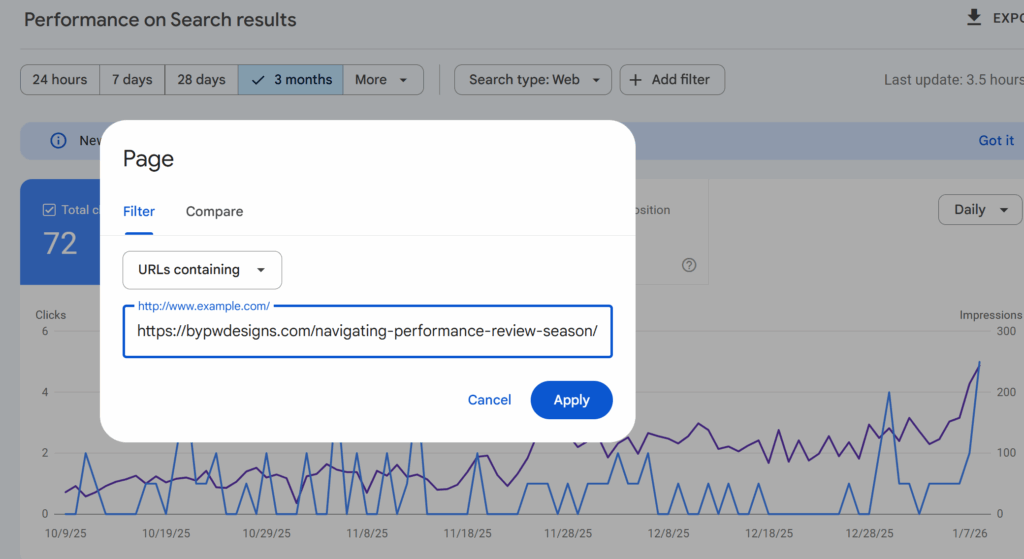
In this case, I am including a screenshot of a blog I wrote prior to knowing about SEO. Its about navigating performance review season in corporate America. When I look at the results, there is barely any impressions, and zero clicks. This is a prime example of a blog, if you want it to bring in organic search, that could be refreshed for SEO.
Evergreen posts that support your services
Evergreen blog posts that support your services are some of the most valuable pages on your site, which also means they deserve regular attention. These are the posts that answer foundational questions, explain your process, or educate someone who’s deciding whether you’re the right fit. When your offers evolve, your messaging gets clearer, or your keywords shift, these posts can quietly fall out of alignment — even if they’re still getting traffic. A thoughtful refresh helps them reflect what you actually do now, connect more intentionally to your services, and guide readers from education to action without feeling salesy.
What to update during a content refresh (in order of impact)
Now that you’ve identified a piece of content that you might want to refresh, let’s talk about things you should consider when updating your blog.
The H1 and Header Structure
Most commonly, especially if you started out blogging prior to knowing about how to optimize for search, your header structure might need updating. Semrush (a leading SEO company), gave a really good visual on their blog about how to format headers.
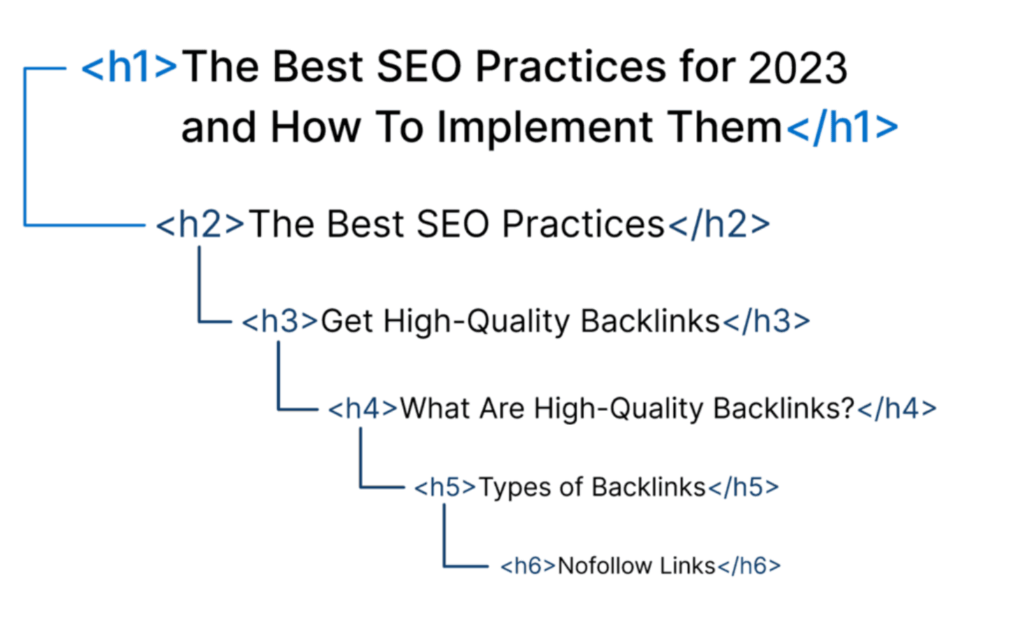
Think of each page as a book. Your H1 is the title of your book, you should only have one. Your H2s are chapters, and H3s are going to be subsections within each chapter. So the first thing you should do is verify that your blog has this header structure. If it doesn’t, how can you either update the headers, or add these sub-sections to clearly tell search what your blog is about and the quality of that information.
Keywords and Search Intent
Before touching any copy, I always start by confirming what a blog post is already ranking for inside Google Search Console. This shows me the real search terms Google is associating with the content — not what I think it’s about. From there, I look at search intent and ask: does this post still answer what someone is trying to find? Once that’s clear, I update headers to re-affirm the core keyword I’m going after, using natural language that mirrors how people search today. This helps search engines understand the topic more clearly while making the post easier for real humans (and AI) to scan and trust.
So for example, with the performance review season blog. My Google Search Console is not actually showing any keywords that I am ranking for for that blog. That’s OK. Take a look at this blog to learn how to do keyword research.
In general, you want your primary keyword to have AT LEAST a 10 search volume and less than a 35 SEO difficulty depending on how competitive the niche you are writing about is:
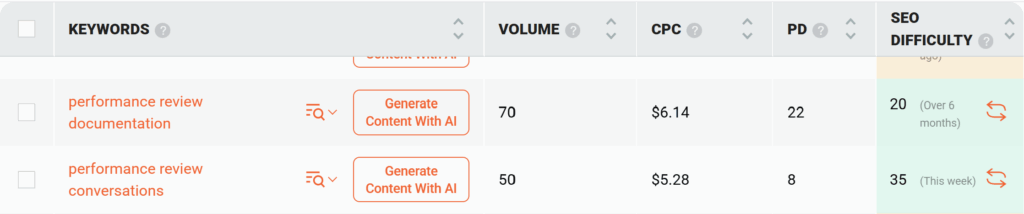
This isn’t about keyword stuffing and including it in every header, this is about using it in your H1 and organically in your blog as necessary. It is also about using sub-headers in the blog that support the primary keyword.
Intro + Conclusion
Your intro and conclusion do a lot more work than people realize. At the top, your intro should make a clear promise about what the reader is going to get, using language that reflects why they searched in the first place.Don’t forget to use your targeted keyword in the first couple of sentences as well. You are aiming for clarity. When someone lands on a refreshed post, they should instantly know they’re in the right place and what problem this content is going to help them solve.
At the bottom, the conclusion isn’t a sign-off — it’s direction. This is where I guide the reader toward what makes sense next, whether that’s exploring a related post, learning about a service, or taking a small action that moves them forward. A strong conclusion turns updated content into a strategic asset, not just another blog post that ends with “hope this helped” and a dead end.
Internal Links
This one is huge, and often overlooked. Your website should be like a spider web. If your post is standing on it’s own, and not linking to anything else, or on the flip side, the blog post you are working on isn’t linking to anything else on the site, search isn’t going to think it’s important. If you don’t think it’s important enough to link, why should search prioritize it? You want to gide readers deeper into your site with relevant, and helpful content.
Meta title and meta description
Another thing to look at is updating your SEO Title and Meta Description. Take a look at the primary keyword you are trying to rank for. Are other people using the year in their blog posts to make it more up to date? What blogs would you be interested in clicking on based on how they read on search? From there, what do you think you are missing? Remember, your SEO title should be no more than 65 characters and entice readers to click while also telling them what the blog is about, your Meta description should be no more than 150 characters and describe the blog in more detail.
Refreshing content for AI search and summaries
When I’m refreshing content for AI search, I focus less on sounding “optimized” and more on answering real questions clearly and directly. AI tools pull from content that explains things well — not content that dances around the point. That means writing in natural language, tightening explanations, and making sure each section actually answers the question it introduces. If someone copied a paragraph into ChatGPT, it should stand on its own and still make sense.
Scannability matters just as much. Breaking content into clear sections, using descriptive headers, and keeping paragraphs focused makes it easier for AI to understand context and easier for readers to skim. This structure helps AI generate summaries while keeping your content readable for humans who are moving fast.
FAQ-style headers are especially powerful here. Questions like “How often should I refresh blog content?” or “Does updating a blog help SEO?” mirror exactly how people search – and how AI surfaces answers. If your site runs on WordPress through Showit, you can take this a step further by using Yoast’s FAQ block on blog posts. This automatically adds schema behind the scenes, helping search engines and AI tools better understand your content and increasing the chances of your answers showing up more prominently in search results.
Done well, this isn’t about chasing algorithms – it’s about making your content clearer, more helpful, and easier to surface wherever people are searching.

Images, alt text, and media updates that support SEO
Images are often the quiet gap in a content refresh. I don’t replace images just to make things look new. I update them when they no longer reflect the brand, the offer, or the message of the post. If an image feels generic, outdated, or disconnected from what the content is actually saying, it’s probably time to swap it. If it still supports the story and loads quickly, keeping it is often the smarter move.
Alt text still matters because it gives search engines and AI tools clear context about what’s on the page. It also plays a critical role in accessibility (which ps is required by law). I write alt text to describe the image naturally and accurately, not to stuff keywords. When done well, it helps screen readers, improves image search visibility, and reinforces the topic of the content without feeling forced.
Refreshing images and alt text supports both accessibility and search by making your content easier to understand. Clear visuals, intentional descriptions, and relevant media help your content communicate more effectively for humans, search engines, and AI summaries alike.
Common Content Refresh Mistakes to Avoid
Creating Duplicate Content
One of the biggest mistakes I see is creating duplicate content without realizing it. This happens when multiple posts start targeting the same topic or keyword after updates. Instead of strengthening your SEO, it confuses search engines and waters down your authority. Every refreshed post should have a clear role and a clear focus, not overlap with another page on your site. Curious on whether you have duplicate content? You can run your website through Siteliner.
Changing URLs without a Plan
Another common issue is changing URLs without a plan. Updating the content does not automatically mean the URL needs to change. When URLs are altered without proper redirects, you risk losing existing rankings, backlinks, and trust you’ve already built. If a URL truly needs to change, it should always be paired with a 301 redirect so search engines and users land in the right place.
Updating content without a keyword strategy
The last mistake is updating content without a keyword strategy. Refreshing copy without confirming what the post is already ranking for or what keyword you want to reinforce turns the update into guesswork. A successful content refresh starts with clarity. Know the core keyword, understand the search intent behind it, and then make intentional updates that support that focus from top to bottom.
How often you should refresh blog content
How often you refresh blog content depends on whether the post is evergreen or timely. Evergreen content should be reviewed regularly to make sure it still reflects your offers, keywords, and audience needs. Timely or trend-based content usually needs fewer touch points once it’s published, unless it continues to drive meaningful traffic or supports a current service.
For most small business owners, a realistic refresh cadence is bi-annually or annually because most don’t have the time for more (including myself). That might look like updating a handful of high-value posts instead of trying to tackle everything at once. A few intentional updates done well will move the needle far more than an overwhelming, all-or-nothing approach that never gets finished.
Consistency is what makes content refreshes effective. You don’t need perfect updates or constant rewrites. You need a repeatable habit of checking in on your content, making thoughtful improvements, and letting those changes compound over time. That steady effort builds stronger SEO results than chasing perfection ever will.
How to decide if a blog post should be redirected or refreshed
First, I never guess. I open Google Search Console. I look at clicks. I look at impressions. I look at the queries it’s showing up for.
Then I decide. Here’s my simple filter:
Refresh it if…
- It’s getting impressions but low clicks.
That means Google likes it. People just aren’t choosing it.
That’s usually a headline, meta description, or clarity problem. - It ranks on page 2–3.
This is prime opportunity territory.
A strategic refresh can move it to page 1. - The topic still aligns with your services.
If it supports what you sell today? Keep it. Strengthen it. - It has backlinks.
If other sites are pointing to it, you do not casually delete that equity.
You improve it. - It’s outdated, but still relevant.
Old stats? Old screenshots? Old examples?
Update it. Add depth. Add FAQs. Add internal links.
Don’t throw away something that already has history.
Redirect it if…
Now we’re talking cleanup.
- It gets zero impressions and zero clicks over a long period of time.
Not a dip. Not a slow month. I mean… crickets for months. - It’s off-brand or no longer aligned with your offers.
If you pivoted and the content attracts the wrong audience?
It might be hurting more than helping. - It’s thin content with no strategic value.
If it’s 300 vague words with no clear keyword target and no real depth?
Sometimes it’s better to consolidate. - You have two posts competing for the same keyword.
Keyword cannibalization is real.
If two blogs are fighting for the same search term, combine them into one strong piece and redirect the weaker one.
Final thoughts: a content refresh is strategy, not busy work
A content refresh is one of the highest ROI SEO tasks because you are improving assets that already exist and already have traction. Instead of starting from scratch, you are strengthening pages that search engines recognize, audiences trust, and algorithms understand. Small, intentional updates often produce faster and more sustainable results than publishing something brand new.
Refreshed content also works harder across platforms. Clear structure, updated keywords, and stronger direction support visibility on Google, make posts easier to repurpose and distribute on Pinterest, and help AI tools pull accurate summaries and answers. One update can improve performance in multiple places without creating more content to manage.
The long-term payoff comes from maintenance. When you regularly update what you have already built, your website becomes stronger over time instead of slowly slipping out of relevance. Content refreshes keep your site aligned with your business, your audience, and how people actually search, which is what creates lasting SEO growth.