How to use Tailwind’s New Keyword Research Tool & the Importance of Keywords for Pinterest
Filed Under


Keywords are the cornerstone of Pinterest. But do you know what a ‘good’ keyword is and how to actually conduct keyword research to make sure the great work you do is seen on Pinterest? You can post beautiful pins, using great pinterest pin templates, stay consistent (which is essential for Pinterest) and still get zero traction. The Difference? You are not using keywords for pinterest.
Pinterest is a search platform. Plain and simple. It isn’t social media, it’s a visual search engine that relies on words to help people find what they are looking for. What’s unique? It’s not just the words you use in the title and description, it’s the words on the Pins.
This episode of Coffee & Conversions was recorded because I wanted to pull back the curtain on how Pinterest actually works, why keywords matter more than trends, and how Tailwind’s new keyword research tool finally gives business owners a way to stop throwing content into the void.
78 \\ Using Tailwind’s New Keyword Research Tool & The Importance of Keywords for Pinterest
If Pinterest has ever felt random, confusing, or like way too much work, keep reading. This is where clarity starts.
Wait, what is a keyword again?
akdjaslj
A keyword is simply the phrase someone types into Pinterest when they’re looking for something specific.
That’s it.
“High protein breakfast.”
“Nursery organization ideas.”
“Pinterest marketing tips.”
“SEO checklist for small business.”
Those phrases are keywords. When someone searches them, Pinterest scans its entire platform trying to find content that clearly matches the words they used. If your pin uses those same words (in the right places), Pinterest knows exactly when and where to show it.
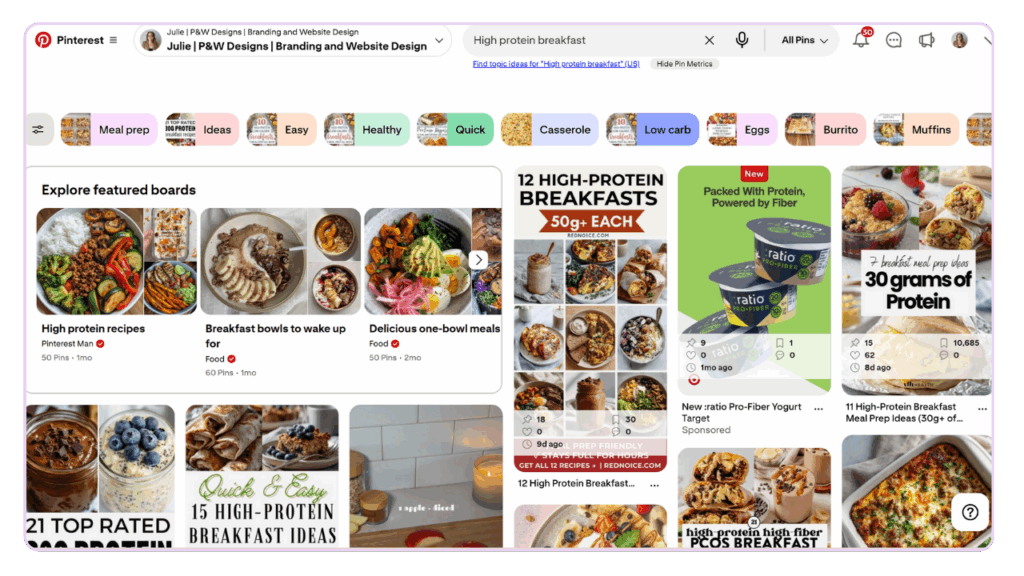
See the little bar of additional words on the top on this example like “meal prep” or “healthy” it is giving you additional long-tail keywords (more than 2 words) that people are searching – GOLD.
Why keywords for Pinterest matter more than anything else
As I said, Pinterest is a search engine. Not a social platform. That means your content isn’t competing for attention in real time – it’s competing for relevance in search.
And search only works when Pinterest understands what your content is about. As I shared in the episode: “Pinterest doesn’t reward the prettiest pictures. It rewards clarity. It rewards knowing exactly what someone is searching for.”
Keywords are how Pinterest knows:
- Who to show your content to
- When to resurface it
- How long it stays relevant
This is why your pins can keep working for months (or years) instead of disappearing in 24 hours like Instagram posts. I’ve seen it with my own eyes. It doesn’t work overnight, hack sometimes it takes months of consistency, but once it does, it’s like magic (let’s be honest – kind of like blogging).
What Tailwind’s new keyword research tool actually does
Tailwind has always been my go-to Pinterest tool for scheduling, batching, and staying sane because it’s the ONLY efficient way to schedule a month’s worth of content in a half day’s work. But their new keyword research tool (currently in beta) is a big upgrade.
It helps you see what people are actively searching for on Pinterest without guessing. Inside the tool, you can:
- Search a topic and see keyword demand
- Get related keyword suggestions
- See which keywords Pinterest is prioritizing (they call this “resonance”)
- Pull keyword ideas directly from your website pages
- Find new content ideas based on real search behavior
I recorded this episode because I want you to understand why this matters but also see how to exactly do it. As I said on the podcast: “Pinterest stops feeling random and starts feeling strategic when you actually have a system behind it.”
Tailwind’s keyword tool is part of that system.
How I use Tailwind keywords (and how I teach it)
I always start with a broad topic – a short tail keyword. Then I let Tailwind show me what people are actually searching. For example, when I type in SEO checklist, Tailwind revealed:
- Local SEO checklist
- SEO checklist for WordPress
- Off-page SEO checklist
- SEO checklist 2025
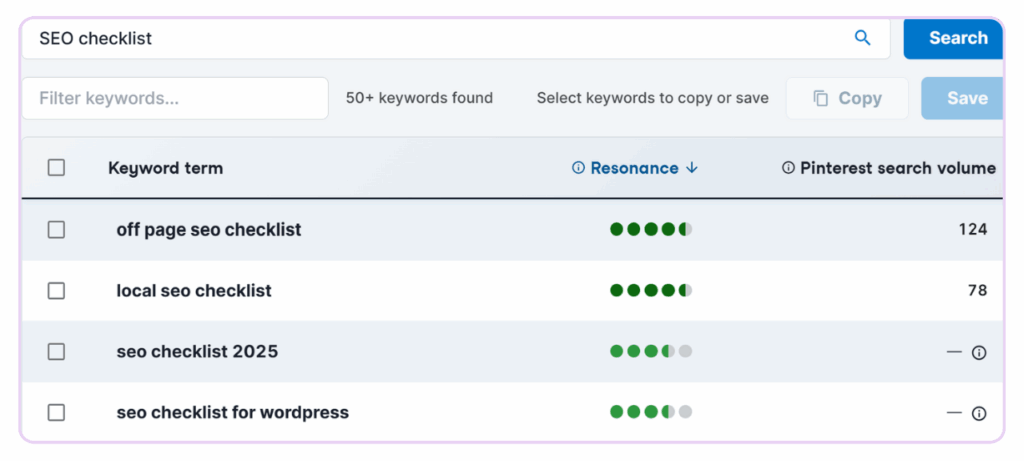
Each of those is a different angle. A different pin. A different opportunity to show up. And here’s the key: “Just because it gives you a list doesn’t mean you use all of them. You use the right ones, consistently.”
This is why I teach diversification. When you schedule multiple pins for the same blog post, you should be using different keywords across titles, descriptions, and images. That gives Pinterest more chances to match your content to search intent.
Tailwind’s New Keyword Research Tool Walk Through
First and foremost, walk through over text is well… boring. So if you are a visual learner like me, make sure you watch my 7 minute walk through video of me actually going into the tool below! It’s a bonus module from my Pinterest Marketing System Course: CREATE IT, PIN IT, and LET IT WORK.
Podcast Episode – Part I
Walk Through – II
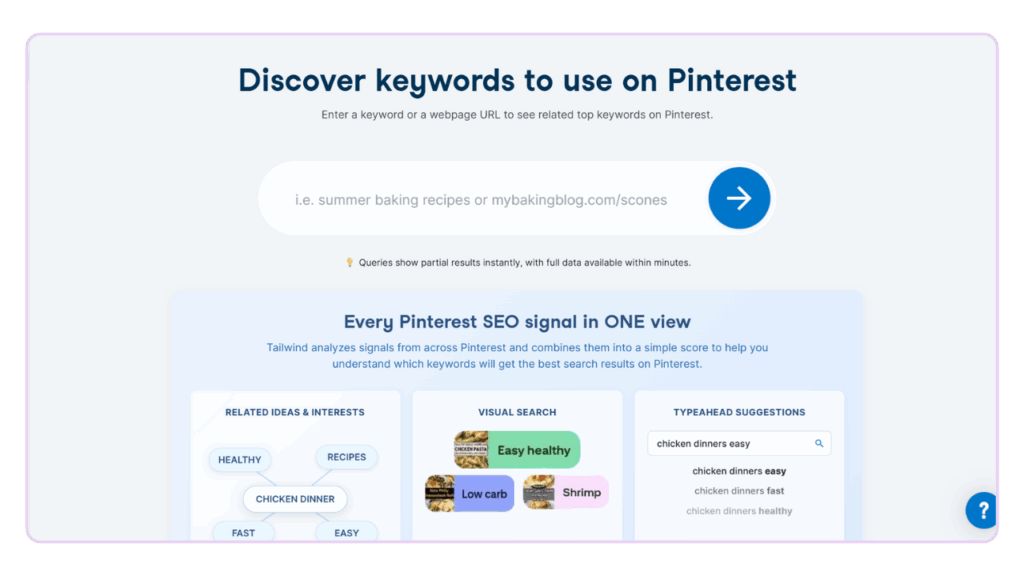
So after you log into tailwind, you will want to click on the left hand side where it says “Keywords (Beta)”.
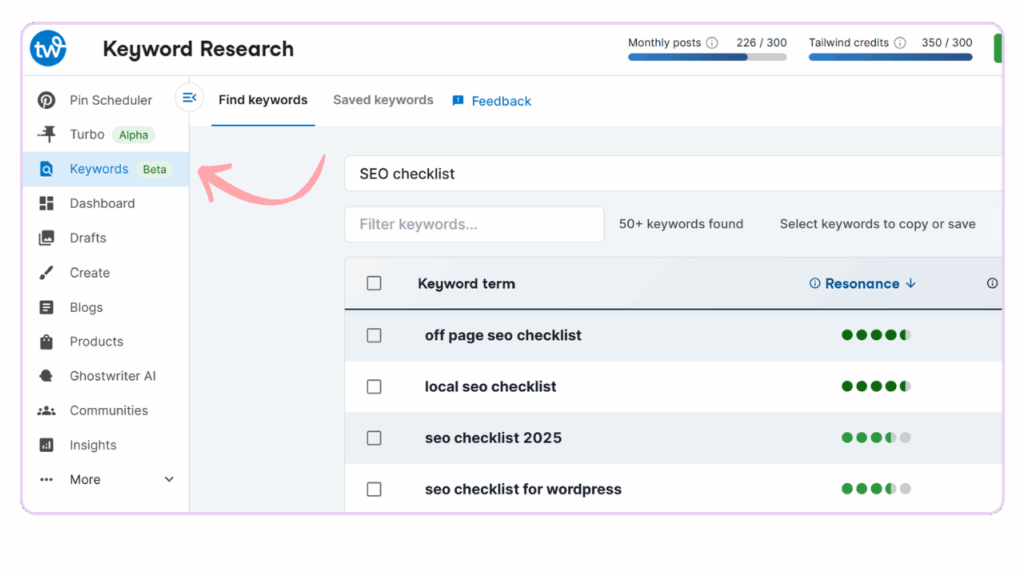
Once you click you will come to the keyword research home page. It will want you to put in a short tail keyword (think 1-2 words) or a URL. Now, don’t be surprised if you don’t already have a keyword rich URL that you don’t get great results with the URL but it’s worth a shot!
After you select your keyword, for this example I am using “SEO Checklist”, you will see a list of keyword ideas with a few different columns. At first glance, it can look like a lot. But once you know what you’re looking at, this tool becomes incredibly powerful.
Let me break it down in plain English.
Keyword term
This column shows the actual phrase people are searching for on Pinterest.
These are real searches. Not guesses. Not ideas pulled out of thin air. When you see things like:
- off page seo checklist
- local seo checklist
- seo checklist template
That’s Pinterest telling you, “People are actively typing this into the search bar.”
These are the phrases you want to be using in:
- Pin titles
- Pin descriptions
- Text on your pin image
- Board names
- Even blog headlines (when it fits naturally)
Resonance (the green dots)
This is the column most people may ignore if they don’t know what it means. Resonance shows how strongly Pinterest is currently prioritizing that keyword.
- More green dots = Pinterest is pushing content with that keyword
- Fewer dots = less momentum right now
This isn’t competition. It’s momentum. I like to think of resonance as Pinterest saying, “Yes, we want more of this content.” When you see a keyword with strong resonance, that’s a great signal to:
- Create more pins for it
- Use variations of it
- Include it in your batching system
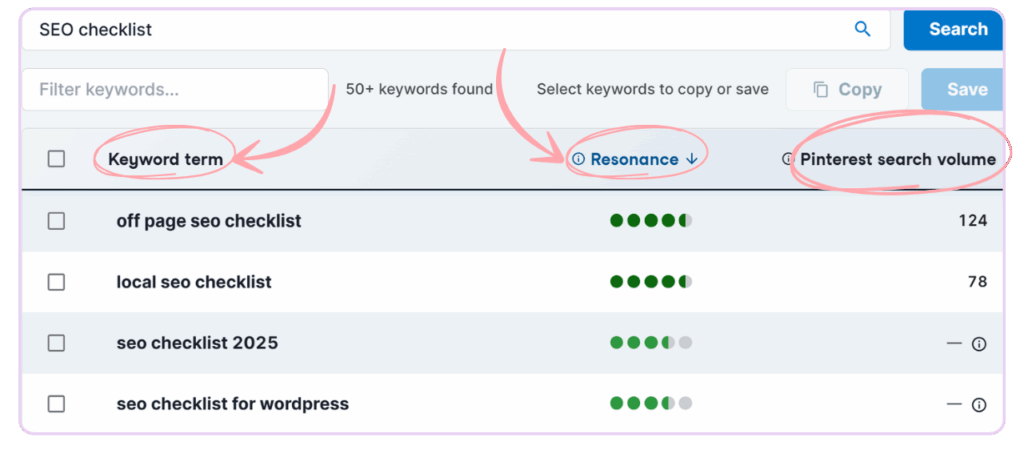
Pinterest search volume
This column shows how often the keyword is searched on Pinterest (when data is available). You’ll notice some keywords have numbers… and some don’t. That’s normal, especially since this tool is still in beta. That’s where you’d use Ubersuggest or your own Google Search Console to assist in the keyword research process (which I teach both in the course). Here’s how I use it:
- If a keyword has volume and resonance → great candidate
- If it has resonance but no volume → still worth testing
- If it has volume but low resonance → use sparingly
Remember: Pinterest is a long game. You’re not chasing viral spikes. You’re building consistent visibility over time.
Could OpenAI buy Pinterest? Yes, Pinterest continues to matter.
One of my SEO clients, and someone connected in the AI/tech world texted me the week before this podcast episode dropped about some interesting buzz in the tech world, and it matters more than you might think if you’re building a business on Pinterest.
A recent Newsweek article (any many other places) shared rumors that OpenAI, the company behind ChatGPT, could be exploring a potential acquisition of Pinterest. There has been no official confirmation from either company, but the conversation alone is worth paying attention to.
Here’s why.
Pinterest is one of the few platforms that is built almost entirely on human visual search intent. People don’t go there to scroll. They go there to find answers, ideas, plans, and solutions. That search behavior is incredibly valuable data, especially in a world where AI tools are being trained to understand how humans think, search, and decide. If tech companies are paying attention to Pinterest, it’s because keywords and intent matter more than ever.
And that’s exactly what this blog post is about.
When you use keywords for Pinterest intentionally, you are teaching the platform what your content is about and who it’s for. You are also future-proofing your content for how search is evolving. Whether that’s Google, Pinterest, or AI-powered discovery tools, the common thread is the same. Clear, specific language speaking as a human and not a robot, wins.
The Newsweek article also pointed out that many users are concerned about what could happen if AI companies influence visual platforms like Pinterest (which I am too). I want Pinterest to stay human. I am already seeing so much AI noise on social, we don’t need more.
When you use real keywords, clear language, and intentional strategy, you create content that stands out because it actually helps someone. And no matter how platforms evolve, helpful content always has a place.
Source: Newsweek, “Is OpenAI About to Buy Pinterest? What We Know” (2025)
Practical takeaways from today’s podcast episode:
- Pinterest is search-first, not scroll-first
- Keywords tell Pinterest who to show your content to
- Tailwind’s keyword tool helps you stop guessing
- Diversify keywords across your pins
- Use keywords in titles, descriptions, boards, and images
- Focus on long-term systems, not short-term wins
FAQs About Keywords for Pinterest
They’re the words and phrases people type into Pinterest’s search bar. Using them helps Pinterest understand your content and rank it correctly. Read this blog for additional information: How to do Keyword Research on Pinterest: Approaches to Long Form Content
Yes. Many Pinterest Marketers and course creators teach that Pinterest is a great place to find keywords by just searching into the search bar. Here’s the problem, that ignores volume and competition. In order I would start with Google Search Console, Ubersuggest, Tailwind, and THEN pinterest. Data is your queen, use it.
One main keyword, plus 1–2 supporting phrases naturally woven into the description and image text. The beauty with Tailwind’s AI scheduling tool is you can feed it your keywords and phrases and it will write the Pinterest titles and descriptions for you!
TLDR (too long, didn’t read)
Pinterest works when you stop guessing and start using data. Keywords are the strategy behind pins that actually perform. Tailwind’s new keyword research tool makes this easier than ever. This is what Coffee & Conversions is all about – clarity over chaos, strategy that actually works, and building a business that supports real life instead of running it.
If you want Pinterest working quietly in the background while you build your business, this is where it starts.
Want to be on Pinterest but don’t want to do the work yourself? Check out my Pinterest Services.
Leave a Reply