ADA Compliance for Websites: What It Is, Why It Matters, and What to Fix First
Filed Under


If you’re a business owner, there’s a good chance you’ve heard the term “ADA compliance for website” recently. Maybe another business owner mentioned it. Maybe you saw accessibility widgets appear on other sites. Or maybe you received an email warning you that your website might not be compliant.
And if your first thought was, “Wait… wasn’t this handled when my website was built?” you’re not alone.
This is one of the most common assumptions I see when auditing client websites. Business owners invest in their brand, trust their designer, launch their site, and move forward assuming everything important was handled behind the scenes.
But accessibility is one of the most commonly overlooked parts of web design—not because business owners don’t care, but because accessibility isn’t always prioritized in the design process.
This guide will explain what ADA compliance for website actually means, the real standards behind accessibility, where most websites fall short, and what practical steps you can take to improve your site.
Disclaimer: This article is for educational purposes only and does not constitute legal advice. For legal guidance specific to your business, consult with an attorney who specializes in ADA or digital accessibility.
Ep 81 \\ What Is Website ADA Compliance And Should I Care?
What ADA compliance for website actually means
ADA stands for the Americans with Disabilities Act, a civil rights law designed to ensure people with disabilities have equal access to public spaces and services.
Originally, this law focused on physical spaces—things like wheelchair ramps, accessible entrances, and physical accommodations.
But today, your website is part of your business infrastructure. It’s your storefront, your marketing engine, and often the first place someone interacts with your brand.
ADA compliance for website refers to ensuring your website can be used by people with disabilities, including individuals who rely on screen readers, keyboard navigation, or assistive technologies to browse the internet.
If someone cannot read your content, navigate your pages, or complete your forms because of how your website is built, your website creates a barrier.
Accessibility exists to reduce those barriers. If you want to see a full checklist, this blog was inspired by this blog post: WCAG Level AA Checklist: Free Site Audit Checklist – accessiBe. I use this tool to scan websites sometimes.
The real standard behind ADA compliance for website: WCAG
The ADA itself does not provide a technical checklist for websites. Instead, accessibility is evaluated using the Web Content Accessibility Guidelines, or WCAG.
WCAG is the global standard used to evaluate website accessibility. These guidelines were created by the World Wide Web Consortium (W3C), the organization that helps define how the internet works.
WCAG is built around four core principles. Your website must be:
- Perceivable
- Operable
- Understandable
- Robust
These principles provide a framework for building websites that work with assistive technologies and remain usable for all visitors.
What perceivable, operable, understandable, and robust actually mean
Perceivable: users must be able to access your content
Perceivable means users must be able to perceive the information on your website.
One of the most common examples is alt text on images. Alt text provides a written description of images so screen readers can interpret them.
Color contrast is another major factor. If your text blends into the background, it may be difficult or impossible for users to read your content.
You can test your website’s color contrast using Adobe’s Color Contrast Analyzer:
https://color.adobe.com/create/color-contrast-analyzer
WCAG recommends a minimum contrast ratio of 4.5 to 1 for standard body text. If users cannot perceive your content clearly, they cannot engage with your website.
Operable: users must be able to navigate your website
Operable means users must be able to interact with your website.
Not everyone uses a mouse. Some users rely on keyboard navigation or assistive devices. Your website must allow users to navigate menus, click buttons, and submit forms using alternative input methods.
If someone cannot navigate your website due to how it’s built, your website creates friction.
Understandable: your website must be structured clearly
Understandable means your content and structure must be logical and predictable.
Headings should follow a clear hierarchy. Forms should include labels. Navigation should be intuitive.
When users understand how your website works, they can move through it confidently.
Robust: your website must work with assistive technologies
Robust means your website must be compatible with assistive technologies such as screen readers and voice navigation tools. These technologies rely on proper structure and labeling to interpret your website.
When your website is built correctly, assistive tools can interpret your content accurately.
The uncomfortable truth: many websites are not fully accessible
One of the biggest misconceptions about ADA compliance for website is that accessibility is automatically handled when a website is built. In reality, many websites unintentionally create accessibility barriers.
Most web designers are trained in visual design—branding, layout, typography, and color systems. Accessibility requires additional structural considerations that are not always part of the design process.
Platforms like Showit, Squarespace, and WordPress provide accessibility tools, but they do not automatically make your website compliant. Accessibility depends on how your website is built and maintained.
This means many business owners assume their website is compliant when accessibility was never addressed.
Five practical improvements to improve ADA compliance for website
Accessibility improvements do not require rebuilding your website from scratch. Many improvements are straightforward and have immediate impact.
1. Improve your color contrast
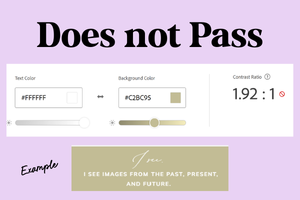
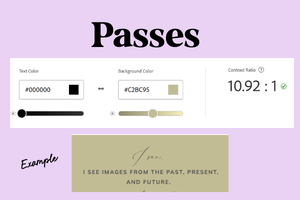
Poor color contrast is one of the most common accessibility issues. Light gray text on white backgrounds may look modern, but it reduces readability. Use Adobe’s Color Contrast Analyzer to test your text and background combinations and ensure your content meets accessibility standards. Improved contrast makes your website easier to read for everyone.
2. Use readable font sizes
Readable text improves accessibility and usability. As a practical guideline:
- Body text should be at least 16 pixels
- 18 pixels is preferred for improved readability
- Headings should scale clearly above body text
Small font sizes create friction and reduce usability.
3. Add alt text to meaningful images
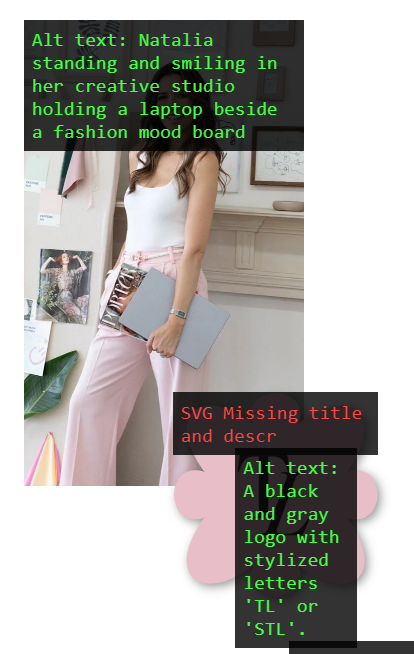
Alt text allows screen readers to interpret your images. If your images communicate information, include clear descriptive alt text. For example: “Web designer reviewing website wireframe on laptop” Alt text ensures your content remains accessible.

4. Use proper heading structure
Headings help organize your content and improve accessibility. Use one H1 per page, followed by H2 and H3 headings in logical order. This improves structure, usability, and SEO. Want to quickly see your headers and if they are right? Use the HeadingsMap plugin as a Google Chrome Extension
5. Ensure buttons and forms are clearly labeled
Buttons should clearly describe their purpose. Instead of vague labels like “Click here,” use descriptive labels like:
- Schedule a consultation
- View services
- Download the guide
Forms should include proper labels so assistive technologies can interpret them correctly.
Accessibility improves usability, SEO, and conversions
Accessibility improvements improve clarity. Clear structure makes your website easier to navigate. Improved readability makes your content easier to consume. Accessibility improvements also align with SEO best practices. Search engines rely on structure, headings, and descriptive content to understand your website. When your website is easier to use, visitors stay longer and interact more confidently.
Accessibility strengthens your website’s foundation.
Accessibility isn’t a legal checkbox. It’s part of building a website that actually works
Most business owners didn’t intentionally ignore ADA compliance for website. They trusted their designer and assumed their website was built correctly. But accessibility is part of building a strategic website.
It improves usability. It improves clarity. It strengthens your website’s ability to support your business long term. Your website is not just a visual asset. It’s infrastructure. When it’s built with accessibility in mind, it becomes stronger, more usable, and more effective.
FAQ: ADA compliance for website
Accessibility laws apply to businesses that serve the public. Websites are increasingly considered part of that public presence. Improving accessibility helps ensure your website works for more users and reduces usability barriers.
WCAG stands for Web Content Accessibility Guidelines. These guidelines define accessibility standards for websites and are used globally to evaluate accessibility.
You can start by testing color contrast, reviewing heading structure, adding alt text, and ensuring readable font sizes. Tools like Adobe’s Color Contrast Analyzer can help evaluate contrast.
No. Platforms provide accessibility tools, but compliance depends on how your website is built and maintained.
Accessibility improvements improve structure, readability, and clarity. These improvements align with SEO best practices and strengthen your website overall.
Leave a Reply