Claude for Project Management: Why I Built My Own Task Management System
Filed Under


Picture this. Six clients, six different Notion boards, and me clicking through every single one just to figure out what was due this week.
That was my reality a few months ago. And as I brought on more retainer clients, I got honestly terrified that I was going to forget something.
So I stopped hunting for the perfect app and built my own. Here’s how I used Claude for project management to create a task hub that runs my whole business, what it actually does, the bugs I hit, and how you can start building yours. And no, I’m not a coder.
Why Notion Stopped Working for My Business
I’ve tried them all. Asana, Trello, ClickUp, Monday, and Notion. I lived in Trello for years, and then everyone started talking about Notion, so I moved over and built a full P&W Designs headquarters there.
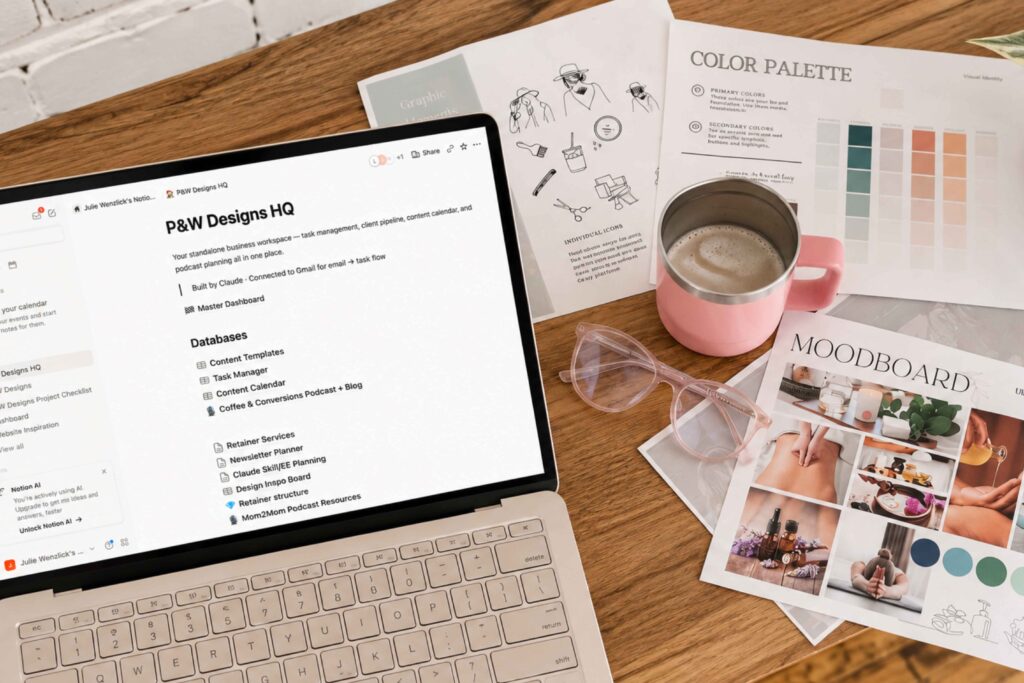
It had a task manager, a client pipeline, a content calendar, and a blog and podcast ideas hub. Every client got their own Notion portal so they could see where we were in their project. And it worked. Kind of.
Here’s the thing. Clients told me it was overwhelming to see every single task, even the ones that weren’t theirs. And nothing rolled up into one view, so I was clicking through a million boards just to build my own to-do list.
If you read about my AI employees earlier this year, you know I was all in on Notion. This is the chapter where I outgrew it. Notion wasn’t broken. It was just answering the wrong question for my business.
My Business Outgrew the Box
My business grew a lot this year. I hired my second VA in July, and between two VAs I’ll soon have about 40 hours a week of subcontractor help.
I didn’t plan on that going into 2026. But hiring specialists lets me stay in my zone of genius (design and strategy) while someone else handles the putzy admin tasks that take forever, even with AI.
The catch? A team needs a system. My VAs are in the Philippines, 13 hours ahead of me, so I can’t email them a to-do list every morning. They need to log in, see what’s theirs, and run with it on their own time.
Client experience matters to me just as much. It’s something I pride myself on in my corporate job, and I want my clients to feel it too.
How I Used Claude for Project Management (Without Knowing How to Code)
After taking Callan Faulkner’s $97 AI bootcamp, I watched someone build a custom dashboard and thought, “Wait. Could I do that?” I ran the idea past my friend at Informed Tech Solutions, and she said absolutely. I almost hired her to build it for me. Then I opened Claude instead.
My first message was literally, “I want to create my own task management system. How the heck do I do this?”
A couple of hours later, I had a password-protected hub on my own subdomain, built with two tools I’d never even heard of. I’m not a coder. I still can’t quite believe it works.
In the episode, I name both tools, explain what each one does, and share the one security rule I’d follow before you build your own.
What’s Inside My Custom Task Hub
It started as a new home for my old Notion tasks. Now it holds more than 15 client portals, my VAs’ to-do lists, and my content plans, all in one view.
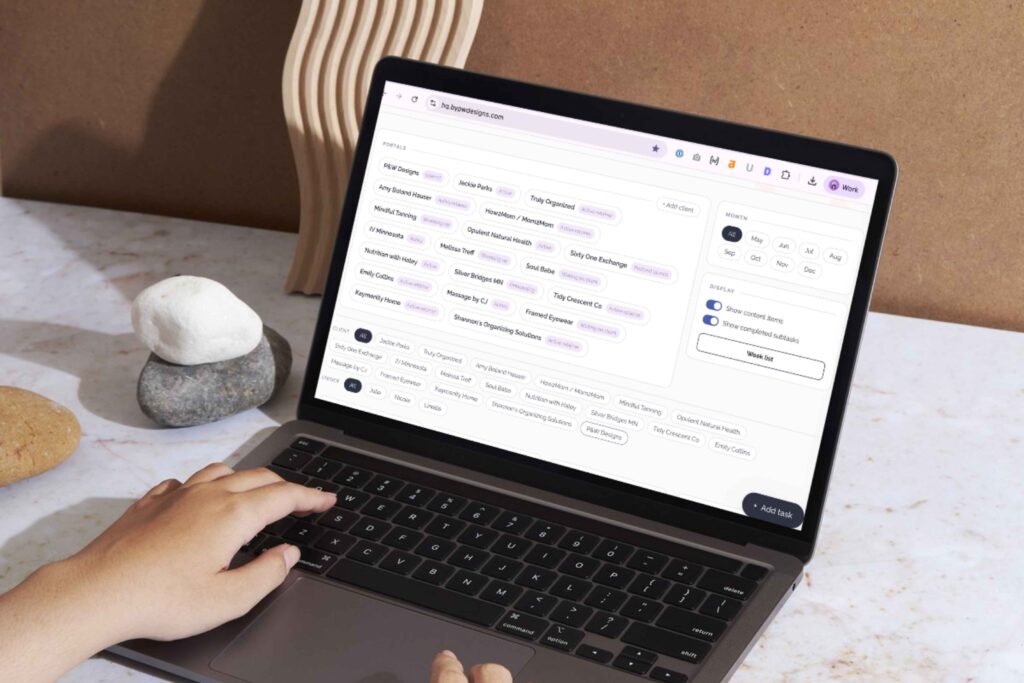
I can see exactly what’s on my team’s plate this week and whether it’s getting done on time. That’s the view Notion never gave me.
I add a new feature almost every week. In the full episode, I walk you through the landing page, section by section.
How Gated Tasks Make AI Task Management Actually Work
This is the part that still blows my mind. I built what I call gated tasks. Here’s the gist: one checkbox kicks off an entire workflow for my VAs, dated all the way to launch day. Everything else stays locked until it’s ready.
The result? The only thing I do for my podcast now is record. That’s it.
On the show, I use this exact episode as the real example (spoiler: I was five days late recording it but you know, my team is amazing). Listen to hear how one box unlocks everything, and how the same setup runs my client blogs too.
How Claude Task Management Lets Me Change Workflows in Minutes

Nothing about this system is locked in. When something isn’t working, I tell Claude “fix this,” and it does.
I recently flipped the entire task list for a 10-page website launch in about 10 minutes of back and forth, without hand-editing a single task. It’s the same launch process every web design client gets, just way easier to see.
I also added one simple column that took a huge amount of stress off my plate. You’ll have to listen to find out which one. (Hint: it has to do with waiting on clients.)
Yes, There Were Bugs
Building your own system means you’ll hit bugs. Mine? Tasks started vanishing.
I went back to Claude, asked “What did you do?” and it figured it out. The full story, including what caused it, is in the episode. Good thing is it always is like “you’re right, my mistake” and figures it out.
Can You Build Your Own Task Management System With Claude?
Yes. And to be clear, I’m not for hire for this one. Do it on your own but use this episode / blog as your inspiration.
Six to 12 months ago, this wasn’t really possible for most of us. Now you can build software shaped around how your business actually runs. It’s the same mindset behind my Claude Pinterest workflow: build the system around you, not the other way around.
Before You Start
- Name the problem your current app can’t solve. Mine was one view across every client and every VA.
- Tell Claude exactly what you want, even if you don’t know the tech words yet.
- Keep passwords and confidential client info out of it.
- Start small and add one feature at a time.
Want the rest? In the full episode, I share the tools I used, the two people who helped me see what was possible, and the features I’ve added since. Press play above.
Claude for Project Management FAQs
Yes. I use a Claude project as my HQ to build and update a custom task hub that holds every client task, VA to-do list, and content plan in one place. Claude doesn’t replace the system itself. It helps you build the system and change it whenever your business changes.
No. I’m not a coder, and Claude walked me through the whole setup in a couple of hours. You do need to be comfortable going back and forth with it, asking questions, and saying "fix this" when something isn’t right.
My setup uses three tools. Claude builds and updates everything, Supabase holds the data and the logins, and Netlify hosts the code that makes the dashboard live on my subdomain. Tell Claude what you want and it can recommend a setup that fits your business.
Gated tasks stay locked until the task before them is done. When I check off recording a podcast episode, my hub unlocks the transcript, keyword research, blog draft, and editing tasks for my VAs. Scheduling stays locked until the edit is finished.
It depends on how it’s built and what you store in it. My hub is password protected, but I only keep tasks in it, never client passwords or confidential info. If you plan to store sensitive data, have a developer review the code first.
A Planner Was Never Meant to Fit Your Life Into a Box
Three years ago, this podcast started as Being Better Everyday Podcast, back when I made custom planners for small business owners. My old saying was that a planner was never meant to fit your life into a box.
Turns out that goes for task management too. Using Claude for project management gave me a system built for my business, my team, and my brain.
I still don’t use AI where I want a human touch. But for running the back end of my business? I’m all in.
Listen to the full episode above for the whole story. And if you want a human strategist on the parts of your business that need one, like your website or your SEO, that’s exactly what I do for my retainer clients.