SEO for Home Organizers: Why a Beautiful Website Isn’t Enough To Get You Found
Filed Under

If you had told me at the start of 2026 that professional organizers would become one of my favorite niches, I wouldn’t have believed you. I hadn’t worked with a single one yet.
This year, I’ve worked with organizers in Santa Barbara, Austin, Sedona, Salt Lake City, Lake Havasu City, and the LA area. Almost every one of them had the same thing in common: a gorgeous website that Google barely knew existed.
So if you’re a home organizer wondering how to get found on Google, this one’s for you. I’m walking you through what SEO for home organizers really looks like, why “keep my site exactly the same” doesn’t always work, and what to do once your foundations are set.
Why Is SEO Essential for Home Organizers?
Here’s something I learned fast. Organizers talk. They have their own communities, they share what’s working, and that’s how one organizer client turned into six this year. Every one of them came from referrals, word of mouth, or AI search.
One organizer found me through ChatGPT. Not Google. ChatGPT. That told me my own SEO was working, even before I had anything on my site about home organizers.
Referrals only take you so far, though. Home organizing is a competitive industry, and if you’re not showing up when someone searches “home organizing near me” or “organizer in [your city],” you’re not getting booked.
That’s also why I have a one-organizer-per-city rule. If I’m helping you rank in Austin, I’m not turning around and helping your competitor down the road go after the same searches. I want my client going for that top spot, and I can’t play both sides.
Can a Website Without SEO Still Bring You Clients?
Not reliably. Organizers are some of my favorite people to have this conversation with, because their websites are usually stunning.
I’m talking perfectly styled pantries and color-coded closets. Some of the best brand photos I’ve ever worked with. (I know we all wish our homes looked like that, instead of stepping on a Lego on the way to the bathroom in the middle of the night. Not that I’d know anything about that.)
But a beautiful website without SEO is like a gorgeous storefront on a street nobody drives down. The biggest problem I see is simple: not enough copy.
Many organizer pages have 200 to 300 words and a few pretty photos. Google can’t rank what it can’t read. If your service page has three photos and the words “Let’s get organized,” Google has no reason to see you as the expert.
Clean doesn’t have to mean empty. Think about a beautifully organized closet. It can be full and still feel calm and easy to use. Your website can work the same way.
What Do SEO Foundations Actually Include?
When I tell a client I’m going to reset their foundations, most people think it means changing a few SEO titles and meta descriptions. It goes a lot deeper than that. Here’s my three-step process.

Step 1: The Technical SEO Audit and Keyword Strategy
First, I make sure your tools are set up: Google Search Console, Google Analytics, Bing Webmaster Tools, and a Google Business Profile. Then we look at your current traffic, what’s working, what’s not, and what people search to find you.
If we’re keeping your current website, I run a technical SEO audit. That means checking every page for missing headlines, broken links, missing meta descriptions, duplicate pages, schema, and page speed.
From there, I research your local competitors to see what they do well and where we can do better. Then every page gets its own primary and secondary keywords, so your pages aren’t fighting each other for the same search.
Here’s an example from this year. I audited a site for an organizer in Santa Barbara who was already ranking number one for “home organizer in Santa Barbara.” Even so, here’s what I found:
- Google was treating her www and non-www versions as two separate homepages because she didn’t have a canonical tag.
- All nine of her pages were missing an H1 headline.
- 26 pages had broken links. Most of it came from one sidebar button, but a broken button on one page is broken on every page that shares it.
- Her service pages all had the same page title and meta description, so Google couldn’t tell her home organizing page apart from her concierge move page.
Her move page didn’t show up in search at all. She had no idea these small things were costing her traffic.
Step 2: Website Copy in Your Own Words
Next comes copy. I have my clients record an audio interview about their brand and story, in their own words. I want their stories, their stream of consciousness, and the little details that make them who they are, not answers they ran through ChatGPT.
My copy isn’t 100% human-written, and I’m upfront about that. I take your words, combine them with my SEO and UX strategy, and run everything through a solid set of copy rules. Good input means good output.
If you’d rather work with a copywriter, I’m good with that. Just make sure they understand SEO.
Step 3: Implementation
Finally, everything goes on your site. New copy, technical fixes, headlines, page titles, meta descriptions, alt text, schema, and redirects where needed.
Often, I’m redesigning parts of the site too, because the pages need to be longer. Which brings me to the conversation I have with almost every organizer.
“I Love My Website and Want It To Stay the Same”
Almost every organizer I’ve worked with has told me this, and I get it. Your whole job is creating systems and making spaces look and feel a certain way. Of course you have a vision for your website.
But looking the same and working the same are two different things. Most websites weren’t built with SEO or user experience in mind. They were built around “here’s what I think people need to know,” and that’s it.
I’m a designer first and an SEO consultant second, and I love design the way you love organizing. That’s why my web design services and SEO work go hand in hand. Give me a little creative freedom, and I’ll keep the vibe you love while making it work harder for you.
Underneath the look you love, I always make three updates:
- Headlines that say what you do and where you do it. I can’t tell you how many organizer sites I’ve looked at this year where I couldn’t figure out where they were located. That’s a problem for clients and for search.
- Page structure that answers three questions fast. Do you do what I need? Do you do it where I live? How do I book you?
- Trust signals. Google wants to see an actual business run by a person who knows what they’re doing. That’s what EEAT (experience, expertise, authoritativeness, and trust) is about.
For organizers, trust looks like an about section, before and after photos of your own projects, reviews and testimonials with client names, your process, your service area, FAQs, and pricing.
Yes, pricing. I know a lot of organizers don’t love this one. But “how much does a professional organizer cost in Austin” is exactly what people type into search. You don’t need a full price list. “Starting at” or “most clients invest” language tells people what to expect.
Marketing vs SEO: Why They’re Different Skill Sets
Marketing for professional organizers matters. But knowing marketing doesn’t mean someone knows SEO.
One organizer I worked with had a marketing and blog person run her own audit of the site. She suggested cutting all the text from the contact page, which is one of the most visited pages on any site. That page needs more than a form.
She also suggested rewriting every H1 headline to remove the target keywords and focus only on emotion. I get the instinct, since you should talk directly to your ideal client. But your site has to do both. It needs to connect with people and make it clear that you offer home organizing in Salt Lake City, Utah.
Do You Need To Switch Website Platforms?
Usually, no. The only times I push for a switch are when you’re on a very old platform or you’re running your website on Canva.
Canva is great for design, but it’s not a website platform. It gives you very little control over SEO basics like page-by-page SEO titles and meta descriptions. If you’re on Canva and want to show up in search, it’s time to move.
A lot of organizers I work with are on GoHighLevel or a white-label version of it. I understand why. It runs your CRM, booking, emails, and website all in one place. You can absolutely rank on it. It does have some design and SEO restrictions, so I often add coded sections to give the site more flexibility.
Showit is still my favorite for design flexibility (yes, I’m biased). But the platform matters less than you think. What matters is that you can control the basics, keep your site updated, and protect your search visibility if you ever do switch.
How To Show Up on Google Maps and Local Search Once Your Foundations Are Set
Once your site is clean and Google can read it, your core service pages become your foundation. Think “home organizing in Austin” and “move management in Austin.” Pair those with a fully set up Google Business Profile, and you’re giving Google what it needs to show you in local results and on the map. Google’s own tips for improving your local ranking say that how well your website ranks plays a part, so good SEO matters here too.
That’s the base. Here’s how I tell organizers to grow from there.
A lot of organizers blog about things like “10 ways to declutter your kitchen” or “the best pantry containers.” The problem is that big brands and magazines already own those searches, and you’re not going to win that fight. I recommend two things instead.
Location Portfolio Pages
These are project spotlights with before and after photos, tied to a specific place. Think “pantry organization project in Sedona, Arizona” or “full move-in unpack in Salt Lake City.”
You can go smaller, too. If I were a Minneapolis organizer, I might highlight a project in Maple Grove or Wayzata. These pages help you show up for the suburbs and neighborhoods you serve, not only your main city.
Niche Service Pages
Most organizers have a general home organizing page and a general move management page. From there, go deeper with pages for closet organization, pantry organization, and garage organization. These are high-intent, hyper-local searches from people ready to hire someone.
Give every page its own content instead of repeating yourself. It takes work, but this is how you build authority in your area.
What Results Can Home Organizers Expect From SEO?
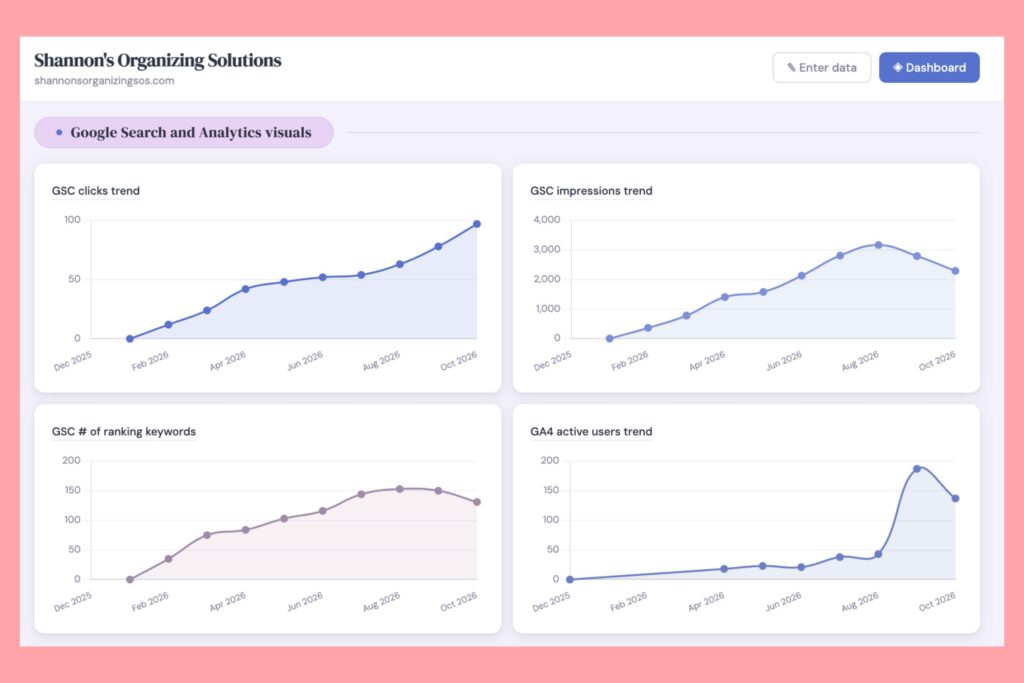
Shannon from Shannon’s Organizing Solutions in Lake Havasu City, Arizona has only done foundations so far. When we compared her last six months in Google Search Console to the six months before we worked together, her Google clicks went from 37 to 147. Her impressions went from 1,266 to over 5,000. That’s roughly four times more on both.
She’s now in the number one spot for searches like “organizers near me,” “closet organizers near me,” and home organizing services in Lake Havasu City. Six pages that used to get zero organic clicks are now bringing in visitors.
Her biggest jump was for “custom closet systems Lake Havasu City,” even though she doesn’t have a page for it yet. That’s exactly the kind of niche service page I’d build next. Here’s how Shannon put it:
“I hired Julie to update my SEO for professional organizing business, and I’m really seeing results.”
Every site moves at its own pace, though. If you’re wondering about timing, I break that down in my post on how long SEO takes to work.
Google isn’t the only place people search anymore, either. Another organizer I worked with found one of her largest clients through ChatGPT within two or three months of setting her foundations. You don’t need a separate strategy for that, and I explain why in my post on LLM SEO and AI search.
What To Do After Your SEO Foundations Are Set
After foundations, I give every client two options. You can work with me on a retainer, where I build a new page each month so your site gets a little bigger and stronger for your area. Or you can do it yourself with the checklist I give you.
What I don’t recommend is doing nothing. Your competitors keep adding pages, and more people are skipping Google entirely to ask ChatGPT, “Who’s the best organizer near me?”
You know this better than anyone. You can create the most beautiful system in the world, but if nobody maintains it, the closet is back where it started six months later. Your website works the same way.
Quick Takeaways for Home Organizers
- Give every page enough copy for Google to understand what you do. Pretty photos alone won’t rank.
- Set up Google Search Console, Google Analytics, Bing Webmaster Tools, and your Google Business Profile.
- Run a technical SEO audit to catch missing H1s, broken links, and duplicate page titles.
- Write headlines that say what you do and where.
- Add trust signals: before and after photos, named reviews, your process, and starting prices.
- Skip generic decluttering posts. Location portfolio pages and niche service pages will do more for you.
- Keep building after foundations. That’s when the growth compounds.
Frequently asked questions
What does SEO for home organizers include?
It starts with strong foundations: setting up Google Search Console and a Google Business Profile, fixing technical issues like missing headlines and broken links, and giving every service page enough copy to explain what you do and where you do it. From there, you keep adding location portfolio pages and niche service pages over time.
How do I show up on Google Maps as a professional organizer?
Fully set up your Google Business Profile, and build service pages that clearly name your city and the areas you serve. Pages like “home organizing in Austin” give Google a clear picture of what you offer and where.
Do home organizers need a blog?
Not in the traditional sense. Generic posts like “10 ways to declutter your kitchen” compete with big brands and magazines. Location portfolio pages and niche service pages, like pantry organization in your city, are a much better use of your time.
Should professional organizers put pricing on their website?
Yes, even if it’s just a starting point. People search questions like “how much does a professional organizer cost” in their city, and a page that answers it is more likely to show up. “Starting at” language works if your packages are custom.
Do I need to switch website platforms to rank on Google?
Usually not. Most platforms, including GoHighLevel and Showit, can rank well when the SEO basics are set up. The exception is Canva, which gives you very little control over things like page titles and meta descriptions.
Ready To Get Your Organizing Business Found?
A beautiful website is a great start. But if you want to get found on Google, SEO for home organizers comes down to strong foundations and a plan to keep building on them.
If you’re a professional organizer in a city I haven’t worked with yet, I’d love to talk. Submit an inquiry through my SEO services page, and we’ll look at your site together and figure out where your foundations need to go.
Want the full story? Listen to the episode below.